

Table of Contents:
- The Camera Is Not the Problem
- Mistake 1: Lighting That Flattens Instead of Reveals
- Mistake 2: A Single Image Where Multiple Are Required
- Mistake 3: Inconsistency Across the Catalog
- Mistake 4: No Context for Scale or Wear
- Mistake 5: Treating Photography as a One-Off Task
- The Fix Is Not a Better Camera. It Is a Better System.
Most jewelry operators know their product photography could be better. What they do not always know is exactly which mistakes are costing them the most — and why fixing them matters more than any other conversion optimization they could run.
75% of online shoppers rely on product photos to make purchase decisions. For jewelry, where the purchase is high-consideration and emotionally loaded, that number is not a statistic to note. It is the operating condition every product page exists within.
The five mistakes below are the ones appearing most consistently across independent jewelry ecommerce operations. Each one is fixable. None of them require a studio.
The Camera Is Not the Problem
The instinct when jewelry photography is underperforming is to look at the camera. Better lens. Higher resolution. Different settings.
The camera is rarely the problem.
The problems that actually kill jewelry ecommerce conversions are systemic: lighting that does not reveal the piece, insufficient angles that leave the buyer with unanswered questions, inconsistency across the catalog that quietly signals unprofessionalism, a missing sense of scale or context, and a shoot process treated as a one-time effort rather than an ongoing system.
Fix those five, and the conversion picture changes.
Mistake 1: Lighting That Flattens Instead of Reveals
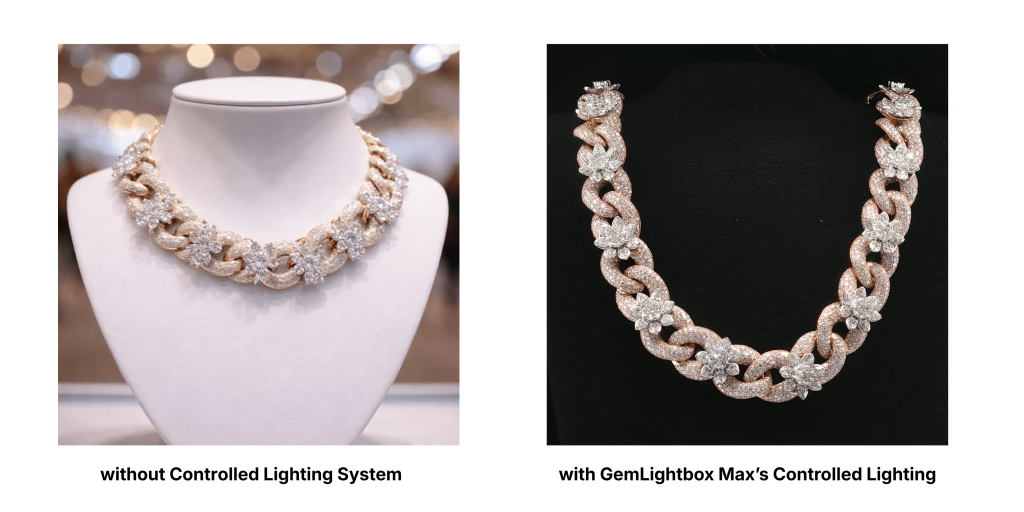
Jewelry is one of the most technically demanding products to photograph because of how it interacts with light. Metal reflects. Stones refract. The way light moves across a piece is precisely what communicates its quality, its finish, and its perceived value.
Bad lighting does not just make a piece look dull. It makes it look cheap. Harsh direct light creates glare that obscures detail. Insufficient light flattens the piece and removes the dimensionality that tells the buyer what they are actually looking at. Shadows in the wrong place suggest flaws that do not exist.
The fix is controlled, diffused, consistent lighting — the kind that wraps around the piece rather than hitting it from one angle. GemLightbox Max is built precisely for this. Its enclosed, purpose-designed lighting environment eliminates the lighting variables that cause most jewelry photography to underperform. The result is every piece photographed under the same controlled conditions, with the kind of light quality that reveals rather than flattens.
Mistake 2: A Single Image Where Multiple Are Required
60% of US digital shoppers insist on seeing at least three or four images before making a purchase. For jewelry, that minimum is not a preference. It is the baseline a buyer needs before they will consider committing to a high-consideration purchase.
A single product shot on a white background answers one question for the buyer: does this piece exist? It does not answer the questions that actually drive the decision. What does the clasp look like? How does the stone sit in the setting? What is the scale of the piece relative to the body? How does the metal finish read from the side?
Every unanswered question is a point of hesitation. Every point of hesitation is a reason to leave without buying.
The standard for jewelry product pages that convert is a minimum of four to six images per SKU: front view, side angle, detail close-up, scale reference, and at least one contextual or lifestyle image. That is not excessive. It is the visual equivalent of what a sales associate would show a buyer standing in front of a display case.

Mistake 3: Inconsistency Across the Catalog
This is the mistake most operators do not see until a buyer does.
When a catalog has been photographed over time — different sessions, different lighting setups, different backgrounds, different crop ratios — the inconsistency becomes visible the moment a buyer browses more than one piece. The page looks like it was assembled from multiple different stores rather than one cohesive brand.
That visual inconsistency does not just look unprofessional. It breaks the buyer’s developing confidence in the brand. A buyer making a considered purchase is already managing risk. Anything that feels inconsistent or misaligned signals that the brand itself may be inconsistent or misaligned — and they leave to find one that is not.
High-volume, catalog-wide consistency is the problem GemLightbox Max solves by design. Because the lighting environment is enclosed and repeatable, every shoot produces images under identical conditions regardless of when it is run or who runs it. The output from a new collection photographed today matches the output from a collection photographed six months ago. That consistency is what builds a catalog that looks like a brand rather than a collection of ad-hoc shoots.

Mistake 4: No Context for Scale or Wear
A jewelry image without context leaves the buyer to guess. How large is the pendant? How does the ring band sit on the finger? How does the necklace length relate to a neckline? These are not secondary details. For many buyers, they are the deciding questions.
Jewelry photography that only shows the piece in isolation — however cleanly shot — is missing the images that close the sale for the buyer who needs to picture themselves wearing it.
Lifestyle imagery is where GemStudio earns its place in the workflow. Rather than requiring a physical model shoot every time a new piece needs a contextual image, GemStudio generates professional AI lifestyle visuals that place the jewelry in realistic, high-quality settings. It removes the logistical barrier that has historically made contextual imagery impractical at catalog scale for independent operators.
The result is a product page that can show the piece in isolation and in context — giving the buyer both the clean detail view and the lifestyle picture they need to make a confident decision.

Mistake 5: Treating Photography as a One-Off Task
The fifth mistake is a systems failure, not a photography failure.
Most independent jewelers treat photography as something that happens when a new collection launches, when a product is missing images, or when the existing photos look noticeably outdated. Between those moments, the catalog deteriorates — new pieces go live with placeholder images, seasonal content falls behind, and social publishing slows because there is nothing fresh to post.
The operators whose photography consistently performs are the ones who have built a repeatable shoot process that runs on a cadence rather than on demand. They photograph new pieces as they arrive, maintain the image standard across the full catalog, and keep fresh content moving through social and product listings without a production bottleneck every time.
The Elite Kit Max — GemLightbox Max and GemCam Pro working together — is the system that makes that cadence operationally achievable for a small team. GemLightbox Max provides the consistent environment. GemCam Pro captures the macro-level detail that a high-consideration buyer expects. Together they make a repeatable, high-output shoot process something a single operator can run efficiently, on any day, without specialist support.

The Fix Is Not a Better Camera. It Is a Better System.
Every mistake above shares a root cause: the absence of a system designed to produce consistent, high-quality output at catalog scale.
Better lighting. More angles. Catalog-wide consistency. Context that closes the sale. A shoot cadence that keeps pace with the business. None of those require a bigger budget or a photography specialist. They require the right system — one built specifically for the operational reality of an independent jewelry operator who needs professional output without studio overhead.
That is the fix. Not a camera upgrade. A workflow upgrade.
Sources
- Retouching Cloud — The Big Data of Product Photography for Ecommerce https://www.retouchingcloud.com/blog/the-big-data-of-product-photography-for-ecommerce
- Photoroom — How Images Impact Conversion Rates on Marketplaces https://www.photoroom.com/blog/images-conversion-rates
- Rewarx — Product Photography Stats 2026: Image Quality and Conversion https://www.rewarx.com/blogs/product-photography-statistics-2026-conversion-rates
- Picup Media Blog — Why Your Jewelry Photos Still Lose Sales and How to Fix the Real Problem https://blog.picupmedia.com/why-your-jewelry-photos-still-lose-sales-and-how-to-fix-the-real-problem/
- Shopify — How to Photograph Jewelry: Tips for Product Photography and Lighting https://www.shopify.com/blog/jewelry-photography
- Picup Media Blog — Jewelry Photos That Sell: Your 2026 Quick Start Guide https://blog.picupmedia.com/jewelry-photos-that-sell-your-2026-quick-start-guide/
- Grabon — 50+ Ecommerce Product Photography Statistics https://grabon.com/blog/product-photography-statistics/



Leave a Reply