

A jewelry virtual try-on uses AR and on-device AI to place a realistic 3D model overlay of a ring, earring, or necklace onto a live camera view or uploaded photo. The system detects facial landmarks, earlobes, hands, or neck points, scales the piece, and keeps it aligned as you move so you get a lifelike preview before buying. Modern toolkits track dense face meshes and detailed hand landmarks in real time on mobile, which is why placement feels accurate.
For realism, try-on engines use occlusion and depth so jewelry can pass behind fingers or hair and sit at believable distances under real lighting. Apple’s ARKit supports people occlusion, and Google’s ARCore provides a Depth API for depth-based occlusion on supported devices.
You can deliver this as WebAR right from a product page for zero-download convenience, or inside a native app when you want more device-level features. Many brands start with WebAR for reach, then add an app for loyalty use cases.
Why it matters?
For shoppers, AR try-on increases confidence and makes side-by-side comparisons easy. For retailers, it boosts engagement and helps reduce uncertainty that leads to returns, with multiple industry reports pointing to growing adoption and positive impacts on ecommerce performance.
Before that, let’s get some basics down.
Jewelry virtual try-on and the real challenges of building one
A jewelry virtual try-on is an AR jewelry try-on experience that lets shoppers preview rings, earrings, and necklaces on themselves in real time. It runs in the browser as WebAR or inside an app and uses the device camera plus hand tracking, face tracking, and a 3D model overlay to place pieces on the user in a real-world setting. The result is a try-before-you-buy moment that reduces uncertainty and lifts purchase intent.
Core build challenges for AR jewelry try-on
- Performance and latency on mobile – Smooth try-on needs high frame rates and low lag across iOS and Android. WebAR must handle varying devices, networks, and browsers without stutter.
- Accurate size and scale – Virtual ring try-on lives or dies by calibration. Finger width estimation, ring size mapping, and stable orientation keep pieces from floating or shrinking.
- 3D assets and materials – Clean CAD or game-ready models, PBR metals, believable diamond and gemstone shaders, and consistent texture workflows are essential for realism.
- Tracking, occlusion, and depth – Robust hand tracking and occlusion let rings sit under fingers and earrings tuck behind hair. Depth cues keep items locked in place as users move.
- Lighting and color accuracy – Real-time lighting estimation and color management keep metal tones accurate and prevent stones from shifting hue between devices.
- UX that converts – One-tap “Try me on,” quick metal and size switches, shareable try-on captures, and an easy path back to add-to-cart drive measurable engagement.
- Privacy and consent – Be clear about camera access, on-device processing, and what data is stored. Align with local regulations and offer transparent controls.
- Compatibility and integration – PDP embeds, WebAR links, analytics events, and CDN delivery for 3D files make the experience reliable at scale.
- Licensing and total cost – Budget for SDK licenses, 3D modeling, QA, and ongoing maintenance so the solution stays fast and secure.
Despite the hurdles, a well executed AR jewelry try-on pays off. Shoppers see realistic scale, movement, and sparkle, retailers showcase more styles without inventory, and both sides gain confidence. Platforms like our very own Jewelry Hub streamline the heavy lifting with ready-to-embed virtual ring try-on that is fast to launch and easy to use.
How Does Our Jewelry Virtual Try-On Tool Work?
The devil is in the details.
To build a realistic jewelry virtual try-on, you must first polish the fine-grained problems. Doing so would ensure an excellent virtual try-on experience for your customers.
Scaling and adjusting the orientation
Proper scaling and adjusting orientation are critical to users’ experience. Good stabilization is necessary to ensure that the model does not float around the scale space and that the item, when tried, would actually provide users a good, though, approximate representation of it.
For example, I have spent hours trying different virtual try-ons and found that for so many of them, the experience was far from satisfactory as the items are often disproportionally positioned and sized. With problems like this originating from the deep learning model or computer vision algorithms and with no means to control the orientation and the scaling, I could say that my interaction with the item did not lead to sales.
Jewelers can easily adjust and scale items in the Jewelry Hub to ensure that it matches the users’ body parts (fingers, ears, neck, arm) even before the try-on begins. Once scaled and adjusted, the algorithm detects feature points in different scale spaces ensuring that it fits and matches the users’ fingers for their chosen rings.

Flexible product-model views
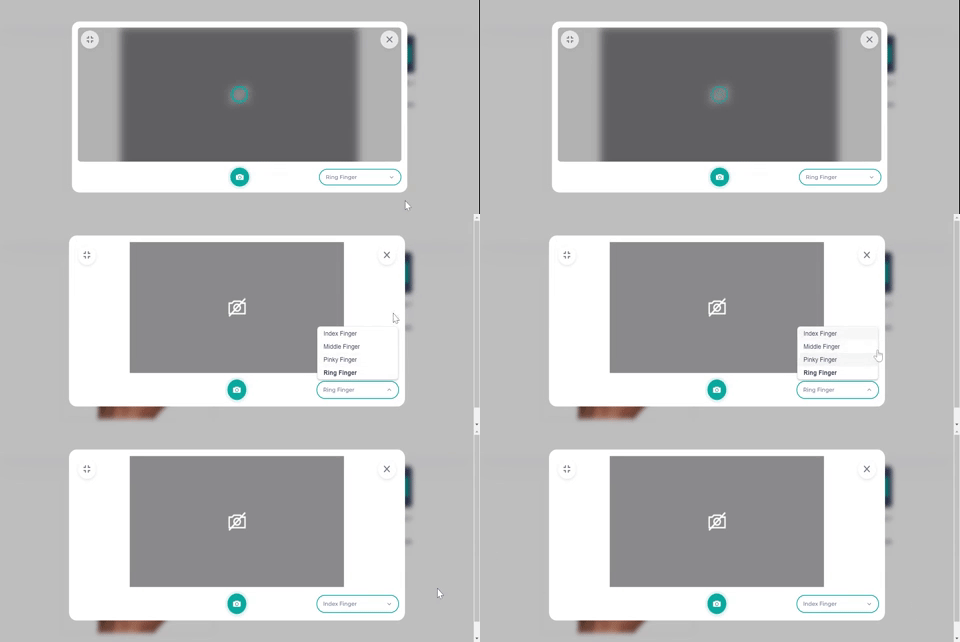
Unlike watches, necklaces, and earrings, rings provide you with more opportunities to allow customers to interact with your product by simply adding a feature that lets them try it on different fingers.
A good jewelry virtual try-on tool must enable jewelry shoppers to select items from your jewelry shops, try on different metals freely, and see the outcomes on the screen to assist their evaluation of jewelry. This addresses the fit, suit, and match dilemma that they usually encounter when shopping online.
Still, the experience diminishes when the tool lacks in performance. For instance, uploading a picture of your hand and simply dragging the item to the finger you choose does not provide adequate visualization data that could satisfy your customers’ utilitarian and hedonic needs. It’s similar to photoshopping and does not really gratify in terms of realistic product visualization.
The option to try on products on different fingers is implementable in the Jewelry Hub without inconvenience to the user. Users don’t need to drag or pinch to align the item. Simply use the finger for the try-on and turn on the camera to see the outcome on the screen.
Shareable try-on outcomes
The ability to capture the try-on outcomes is one of the factors that make a jewelry virtual try-on tool an effective sales-boosting addition to your marketing arsenal. Users like it when they can seek their friends’ opinions by sharing how an item looks on them, albeit visually. Considering this aspect, a jewelry virtual try-on tool carries a social value that reflects the behavior of younger consumers, particularly the millennials and Gen Z.
“76% of polled consumers are more likely to trust content shared by their peers than by brands.” – says Adweek
“92% of polled consumers trust peer recommendations.” – says Search Engine Watch
Set up and ease of use
According to a study, users assess the utilitarian value of a virtual try-on tool based on its usefulness and ease of use. This finding suggests that the users’ purchase decision intention correlates highly with their usage experience.
Additionally, the perceived usefulness and enjoyment affect your customers’ attitude towards the virtual try-on tool while the ease of use affects the perceived usefulness and enjoyment. Hence, when integrating a jewelry virtual try-on tool into your website, ask this: is it easy to use? When you get this right, you increase your customers’ purchase intention because interactive technologies trample passive product presentation effortlessly.
Allow users to try on your jewelry items by simply turning on their cameras. A try-on tool that asks users to adjust, pinch to resize, and drag and drop just to get the placement right causes a lot of friction. Simple navigation like this is achievable in the Jewelry Hub. It’s straightforward for both the jewelers and the end-users.
How does it work?

If you’re a customer, you simply click the “try me on” button on the jeweler’s product page, turn on your camera, and you’re good to go. If you’re a jeweler, you get more than just a jewelry virtual try-on tool. The Hub allows you to create a public or private shareable try-on link that you can send to customers for an exclusive shopping experience. Recipients of the link will just click the link you sent to try the item on. See and try it live on the Just Gold Jewellery website or click here for an instant augmented reality experience.
Frequently Asked Questions:
How does virtual try-on work?
Virtual try-on is a virtual fitting technology that works using augmented reality. With this feature, users can try on products without leaving their homes and using only their mobile devices or computers.
What are the benefits of digital jewelry?
Digital jewelry pieces have embedded intelligence that can store users’ personal information. This is especially helpful for those who often forget their passwords and other security badges.
How do you see what you’ll look like with earrings?
You can try on earrings using virtual try-on apps on your smartphone or computer.
Final Thoughts
Given the new normal, the jewelry virtual try-on tool has become a hygiene factor. But it offers a lot of benefits for jewelry retailers; thereby, making it the next step in retail evolution. The increasing demands are not lying. If 71% of consumers would shop more often if brands used AR, what’s holding you back?


Leave a Reply